Three-dimensional content is becoming increasingly important in digital design, product development, gaming, education, and 3D printing. However, creating a detailed 3D model from scratch can require specialized software, technical knowledge, and considerable time. Beginners may find traditional modeling tools difficult to learn, while experienced creators often need faster ways to develop concepts and prepare assets for further work.
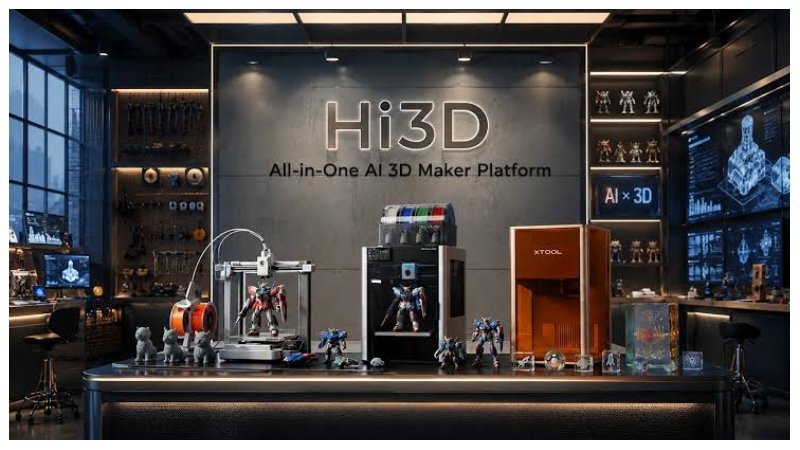
Hi3D is an AI-powered 3D creation platform designed to make this process more accessible. It helps users turn images into three-dimensional models and brings several related tasks—such as image generation, AI texturing, model splitting, relief creation, and multi-color print preparation—into one workspace. Instead of treating 3D generation as an isolated step, Hi3D supports a broader journey from an initial idea to a digital asset that can be refined, exported, or prepared for physical production.
What Is Hi3D?
Hi3D is an online AI 3D creation platform for hobbyists, makers, designers, and teams that need to develop 3D assets. Its image-to-3D capabilities use AI models developed by Math Magic, including Sparc3D and Ultra3D, to interpret visual references and reconstruct three-dimensional forms. Users can start with an image rather than building every shape manually, making it easier to explore ideas and produce a first version of a model.
The platform is intended for a range of experience levels. A beginner can upload a reference image and use the generated model as a starting point. A more experienced creator can use the output as a base for further editing in compatible 3D software. Hi3D does not remove every need for modeling knowledge or quality checks, but it can reduce some of the repetitive work involved in initial asset creation.
Hi3D also connects generation with practical output. Models can be exported in common formats for other creative tools or 3D printing workflows. For users who want a physical object but do not own a printer, the platform also presents a print-and-delivery option in supported workflows. This combination makes Hi3D useful for people interested in both digital assets and tangible creations.
Image-to-3D Generation for Faster Modeling
Image-to-3D generation is one of Hi3D’s central capabilities. Users upload a picture of an object, character, accessory, or concept, and the system generates a three-dimensional representation. This can help users move from a visual reference to a model without manually building the entire mesh from the beginning.
Hi3D supports common image formats, including JPG, PNG, and WebP, with a maximum size of 20 MB per image in the documented workflow. For a straightforward task, users can provide a single image. When additional views are available, multi-view generation can use two to four images, with a front view required. Providing useful views of the same subject can give the system more information about its shape and help it reconstruct areas that are not visible in a single picture.
Hi3D’s V3.0 generation experience emphasizes high geometric detail, with a 2048³ voxel-level resolution option and support for textures up to 8K in the advertised workflow. These capabilities are intended to help preserve proportions, contours, small structures, patterns, and surface details more faithfully. They can be useful when a model will be viewed closely, textured, or prepared for further production, although the final result should always be evaluated against the project’s requirements.
Text-to-Image Tools for Exploring Ideas
Not every project begins with a finished reference image. Sometimes a creator has only a written description, a mood, or a rough concept. Hi3D includes text-to-image functionality that can turn natural-language prompts and reference inputs into visual concepts. Users can generate multiple image variations and choose a direction before moving into 3D creation.
For example, someone designing a fantasy figurine could describe its clothing, pose, materials, and overall style, then compare several visual interpretations. A product designer could explore alternative appearances for a decorative object before deciding which concept deserves further development. The generated images can serve as references for the next stage, rather than requiring the user to draw every detail personally.
Starting with a visual concept can also help users communicate their ideas. A written description may be interpreted differently by different people, while an image gives the project a more concrete direction. The text-to-image step does not guarantee that every generated image will translate perfectly into a 3D model, but it offers a convenient way to develop and refine a starting point within the same creative environment.
AI Texturing and Surface Detail
Geometry defines the shape of a 3D object, but surface appearance often determines how convincing it looks. Hi3D provides AI-assisted texturing tools to help users add or refine the visual surface of a model. As an ai 3d model texture generator, it allows users to explore different surface appearances as part of the 3D creation process. Depending on the workflow, users can generate geometry first and apply textures afterward, or create geometry and texture together.
The platform supports PBR-oriented texturing workflows. Physically based rendering, commonly known as PBR, is a material approach used to create more consistent surface appearances under different lighting conditions. This can help creators prepare assets for rendering and digital environments where material response matters. Texture workflows can be useful for exploring wood, metal, fabric, painted surfaces, skin, or stylized materials, depending on the reference and the project’s needs.
For users who already have a model, texturing can be a practical way to explore a different visual style without rebuilding its geometry. For those starting from an image, the combined geometry-and-texture workflow can reduce the number of separate steps required to produce a more complete asset.
Relief Creation from Images
Hi3D includes a 3D relief tool that converts a two-dimensional image into a raised or layered surface. Unlike a full three-dimensional reconstruction of an object, a relief emphasizes changes in depth across an image. This makes the approach suitable for artwork, decorative plaques, emblems, personalized keepsakes, and other projects where the image itself is the main focus.
Relief generation can be useful when a user wants to transform a logo, illustration, portrait, or ornamental design into a physical object. The resulting model can be exported in supported formats and reviewed for printing or further editing. Users should consider the source image’s contrast and detail, because these characteristics can influence how clearly the image’s features translate into depth.
Model Splitting for Easier 3D Printing
A complex model may be too large for a printer’s build area or may be difficult to print as one piece. It can also contain overhangs or shapes that are easier to produce separately and assemble afterward. Hi3D’s split-to-print functionality is designed to help address these challenges by dividing a model into separate parts and supporting connector creation.
Rather than manually planning every cut and connection from scratch, users can use the splitting workflow to learn how to split a 3d model for printing into more manageable sections. Connectors can help parts fit together during assembly, while automatic layout tools can assist with arranging components for printing. This is especially relevant to figurines, character models, props, and larger decorative objects.
Multi-Color Model Preparation
Color is an important part of many printed objects, from character figurines and toys to signs, ornaments, and product prototypes. Hi3D provides multi-color printing tools that identify color regions and help separate a model into areas suitable for a multi-color workflow. The platform also supports preparation steps intended to connect model generation with slicing and printing software.
This can make it easier to plan a model in which different parts have different colors. Instead of treating color as a purely visual texture, the workflow helps users prepare distinct regions for physical production where compatible equipment and software are available. Color separation can be especially useful for designs with clear boundaries, such as a figure with contrasting clothing, a badge with a colored symbol, or a decorative object with several defined areas.
Export Formats and Creative Flexibility
A useful 3D asset should be able to move beyond the tool that created it. Hi3D supports several common export formats, including OBJ, GLB, STL, FBX, USDZ, and 3MF, with the exact options depending on the feature being used. These formats serve different purposes. STL and 3MF are commonly associated with 3D printing, while OBJ, GLB, and FBX can be useful in modeling, visualization, animation, and real-time content workflows. USDZ is used in certain augmented-reality and 3D viewing contexts.
Exporting a model gives users flexibility to continue working in compatible third-party software. They may adjust geometry, change materials, prepare a scene, or check print settings according to the project’s requirements. The best format depends on the intended use, and users should confirm that the receiving application supports the chosen file type and preserves the data they need.
From Digital Model to Physical Object
Hi3D is designed to connect digital creation with the practical steps involved in making a physical object. Users can prepare models for printing, export them for use with compatible slicing software, and continue through a familiar print workflow. Tools such as model splitting, connector generation, and multi-color preparation help address some of the tasks that arise between generating a model and producing it.
For users who do not have a 3D printer, Hi3D also offers a print-and-delivery service in supported regions and workflows. The idea is straightforward: select a model, choose available material and size options, and arrange for the finished object to be produced and delivered. Availability, material choices, prices, and delivery conditions may depend on the order and location, so users should review the options presented by the service before placing an order.
Uses Across Creative and Professional Projects
Hi3D’s tools can support a variety of workflows. Hobbyists may create personalized figurines, tabletop accessories, cosplay props, decorative pieces, and gifts. Image-to-3D generation can help establish a model, while splitting and multi-color preparation can make some designs easier to print and assemble.
Designers and product teams can use the platform to explore visual concepts and develop preliminary models. A generated asset may help communicate the shape of a product or serve as a starting point for prototyping. It should not automatically be treated as a final engineering model, particularly where exact dimensions, mechanical performance, safety, or manufacturing tolerances are important. Those requirements need appropriate professional review and refinement.
Game developers and digital artists may use generated models as early-stage assets, references, or prototypes. The ability to export common formats can help them move assets into a compatible content pipeline for further editing. Educators and learners can also use image-based generation to explore how flat references can be translated into three-dimensional forms, making abstract spatial concepts easier to discuss and examine.
The platform additionally provides API capabilities for businesses and developers who want to integrate 3D generation into their own products or workflows. The documented API features include image-to-3D generation, relief creation, model splitting, and multi-color model processing. This can be relevant to services that need to automate parts of asset creation rather than asking each user to operate a separate interface. Integration still requires technical implementation and evaluation to ensure that the generated outputs meet the application’s needs.
A Practical Workflow for New Users
A simple way to begin is to choose a clear image of the object or design to be created. Upload the image in a supported format and select the relevant generation option. If several views are available and the task supports multi-view input, include the required front view and additional angles that reveal important structure. Then generate the model and inspect it from different directions.
After generation, decide what the asset needs next. Some models may benefit from AI texturing; others may need to be split into printable pieces or prepared for multi-color production. A relief tool may be more suitable for a flat illustration intended to become a plaque. Export the result in a format that matches the next step, whether that is editing in another application, viewing the asset, or preparing it for a 3D printer.
Before printing or using a model in a larger project, check its dimensions, geometry, surface appearance, and file compatibility. For printed objects, also consider the printer’s build volume, material properties, support needs, and assembly requirements. These checks help bridge the gap between a promising AI-generated draft and a model that is suitable for its intended purpose.
Hi3D brings image-based 3D generation together with visual ideation, texturing, relief creation, model splitting, multi-color preparation, export options, and printing-oriented workflows. By gathering these tools in one environment, it gives beginners a more approachable entry point and offers experienced creators another way to speed up early production tasks. Whether the goal is a digital asset, a design prototype, or a physical object, Hi3D provides a flexible starting point for turning visual ideas into three-dimensional work. Click here for more Information.